
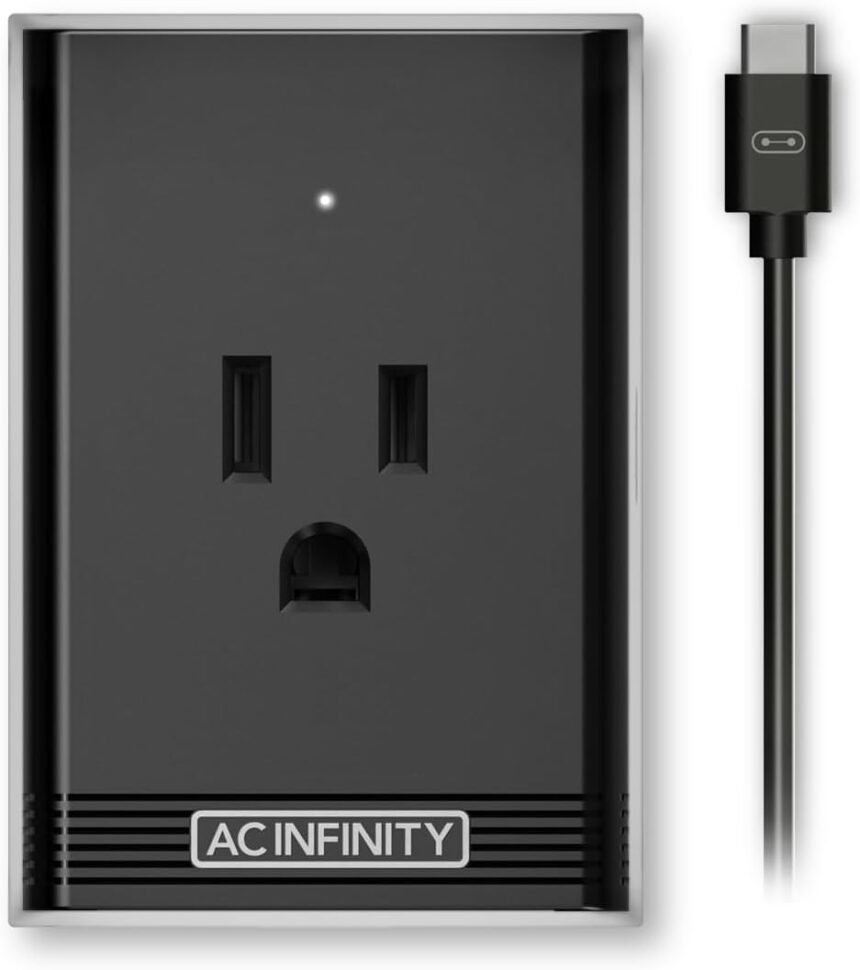
Have you ever wanted to control and monitor your grow equipment from anywhere using your phone? If so, the AC Infinity UIS Control Plug is the perfect solution for you. With this handy device, you can connect your UIS Smart Controllers to outlet-powered devices like humidifiers, dehumidifiers, and A/Cs, allowing you to automate climate triggers, cycles, timers, and scheduling with ease. Let’s take a closer look at this innovative product.

Product Overview
The AC Infinity UIS Control Plug is designed to work seamlessly with the CONTROLLER 69 PRO, enabling you to control and monitor your grow environment remotely. This outlet adapter allows you to connect your UIS Smart Controllers to outlet-powered devices, expanding the capabilities of your grow setup. Whether you’re a seasoned grower or just starting out, this plug is a game-changer for anyone looking to optimize their plant’s environment.
Specifications
To give you a better understanding of what the AC Infinity UIS Control Plug has to offer, here are some key specifications to consider:
| Specification | Details |
|---|---|
| Product Name | AC Infinity UIS Control Plug |
| Compatibility | Works with CONTROLLER 69 PRO and outlet devices |
| Wattage Load Limit | Not suitable for devices with continuous high wattage loads |
| Recommended Devices | Humidifiers, dehumidifiers, A/Cs |
| Control Options | Automate climate triggers, cycles, timers, scheduling |
| Safety Precautions | Avoid devices that are not designed for rapid on/off cycling |
Features
Let’s dive into some of the standout features of the AC Infinity UIS Control Plug and how they can benefit your grow operation.
Remote Monitoring and Control
With the AC Infinity UIS Control Plug, you can control and monitor your grow environment from anywhere using your phone. Whether you’re at home, at work, or on vacation, you can stay connected to your plants and make adjustments as needed. This level of remote control gives you peace of mind and ensures that your plants are thriving, no matter where you are.
Climate Automation
One of the most powerful features of the AC Infinity UIS Control Plug is its ability to automate climate triggers, cycles, timers, and scheduling. This means you can set specific parameters for your grow environment and let the plug do the rest. Whether you need to adjust humidity levels, maintain a specific temperature, or control the timing of your equipment, the UIS Control Plug makes it easy to create the perfect growing conditions for your plants.
Data Graphs and Alert Notifications
The AC Infinity UIS Control Plug is equipped with a user-friendly app that allows you to access data graphs and receive alert notifications on your phone. This means you can track key metrics like temperature, humidity, and lighting levels in real-time and receive alerts if any parameters fall outside of your set ranges. With this level of insight, you can make informed decisions about your grow environment and ensure that your plants are healthy and happy.


Installation and Setup
Setting up the AC Infinity UIS Control Plug is quick and easy. Here’s a step-by-step guide to get you started:
Step 1: Compatibility Check
Before you begin, make sure that your outlet-powered devices are compatible with the AC Infinity UIS Control Plug. The plug is designed to work with equipment that automatically starts when plugged in, so be sure to avoid devices with continuous high wattage loads, such as heaters.
Step 2: Connect UIS Smart Controllers
Next, connect your UIS Smart Controllers to the AC Infinity UIS Control Plug using the provided cables. Make sure that the connections are secure and that the plug is properly positioned near your outlet-powered devices.
Step 3: Download the App
Download the AC Infinity app from the App Store or Google Play Store and follow the on-screen instructions to create an account and pair your devices with the app. Once you’re set up, you’ll have full control over your grow environment right at your fingertips.
Step 4: Set Parameters
Using the app, set your desired parameters for temperature, humidity, lighting schedules, and more. The AC Infinity UIS Control Plug will then automate these settings according to your specific requirements, giving you peace of mind that your plants are receiving the care they need.
Safety Precautions
While the AC Infinity UIS Control Plug offers a wide range of benefits for your grow operation, it’s important to follow some safety precautions to ensure a safe and efficient setup.
Avoid Overloading
Be mindful of the wattage load limit of the AC Infinity UIS Control Plug and avoid connecting devices with continuous high wattage loads. This can cause the plug to overheat, melt, or pose a fire risk, so it’s essential to only use compatible devices with the plug.
Rapid On/Off Cycling
The UIS Control Plug is not designed for rapid on/off cycling, as this can also lead to overheating and potential safety hazards. Be sure to set appropriate timers and intervals for your equipment to prevent any issues with the plug’s performance.
Regular Maintenance
To keep your AC Infinity UIS Control Plug in optimal condition, perform regular maintenance checks to ensure that all connections are secure and that the plug is functioning correctly. If you encounter any issues or malfunctions, contact customer support for assistance.

Conclusion
In conclusion, the AC Infinity UIS Control Plug is a must-have accessory for any grower looking to streamline their grow operation and monitor their plants with ease. With its remote monitoring and control capabilities, climate automation features, and data graphs and alert notifications, this plug offers a comprehensive solution for optimizing your plant’s environment. Whether you’re growing at home or in a commercial setting, the UIS Control Plug is a powerful tool that will help you achieve the best results for your plants. Enhance your grow setup today with the AC Infinity UIS Control Plug and experience the benefits of smart control and monitoring firsthand.